
Every time you open a website, your browser quietly gives away a unique identity. No cookies needed. No login required.
A hidden script draws an invisible image on your screen and converts it into a digital signature. That signature is called a canvas fingerprint, and in 2026, it remains one of the most powerful online tracking techniques used by advertisers, fraud detection platforms, and analytics firms.
For affiliate marketers running multiple accounts across ad networks, understanding canvas fingerprinting protection is no longer optional.
It is essential. If you are scaling campaigns, managing several GEOs, or split-testing offers, your accounts are at risk unless you know how to handle browser fingerprint tracking.
How Canvas Fingerprinting Actually Works
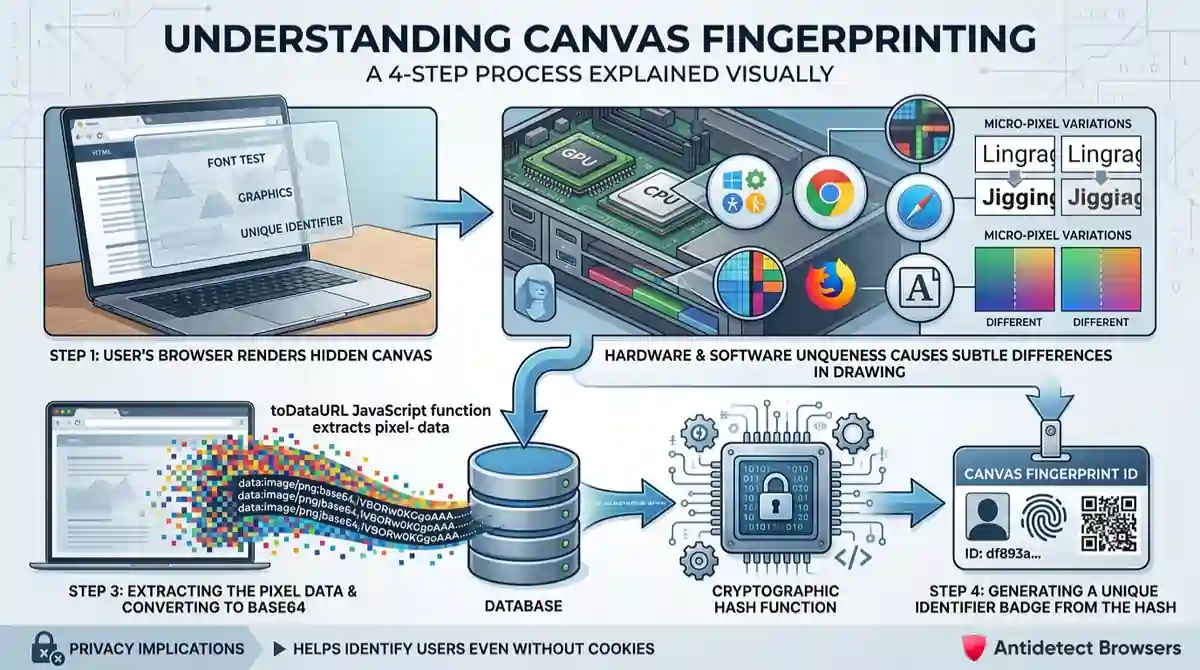
Canvas fingerprinting exploits an HTML5 element called the canvas. Websites use it to render graphics, animations, and text. But tracking scripts abuse it to identify users silently.
Here is what happens behind the scenes:
Even two devices with identical specs can produce slightly different renders. That is what makes canvas fingerprint identification so effective. According to 2026 research, canvas fingerprinting alone contributes 8 to 10 bits of identifying entropy.
It is enough to single out a user among roughly 250,000 to 4,000,000 others. About 14.8% of the top 10,000 websites actively deploy it through advertising SDKs and tag management systems.
Why Canvas Fingerprints Are So Hard to Escape

Unlike cookies, you cannot simply clear a canvas fingerprint. It is not stored on your device. It is generated fresh each time a script runs, based on how your system renders graphics.
Standard privacy tools fail against it:
Research from the Electronic Frontier Foundation shows that 83.6% of browsers carry a unique fingerprint. Stock Chrome on Windows hits a 96.4% uniqueness rate.
Once your unique browser fingerprint is captured, ad platforms and fraud detection systems link it to all your accounts, sessions, and devices.
How Fingerprinting Has Evolved in 2026
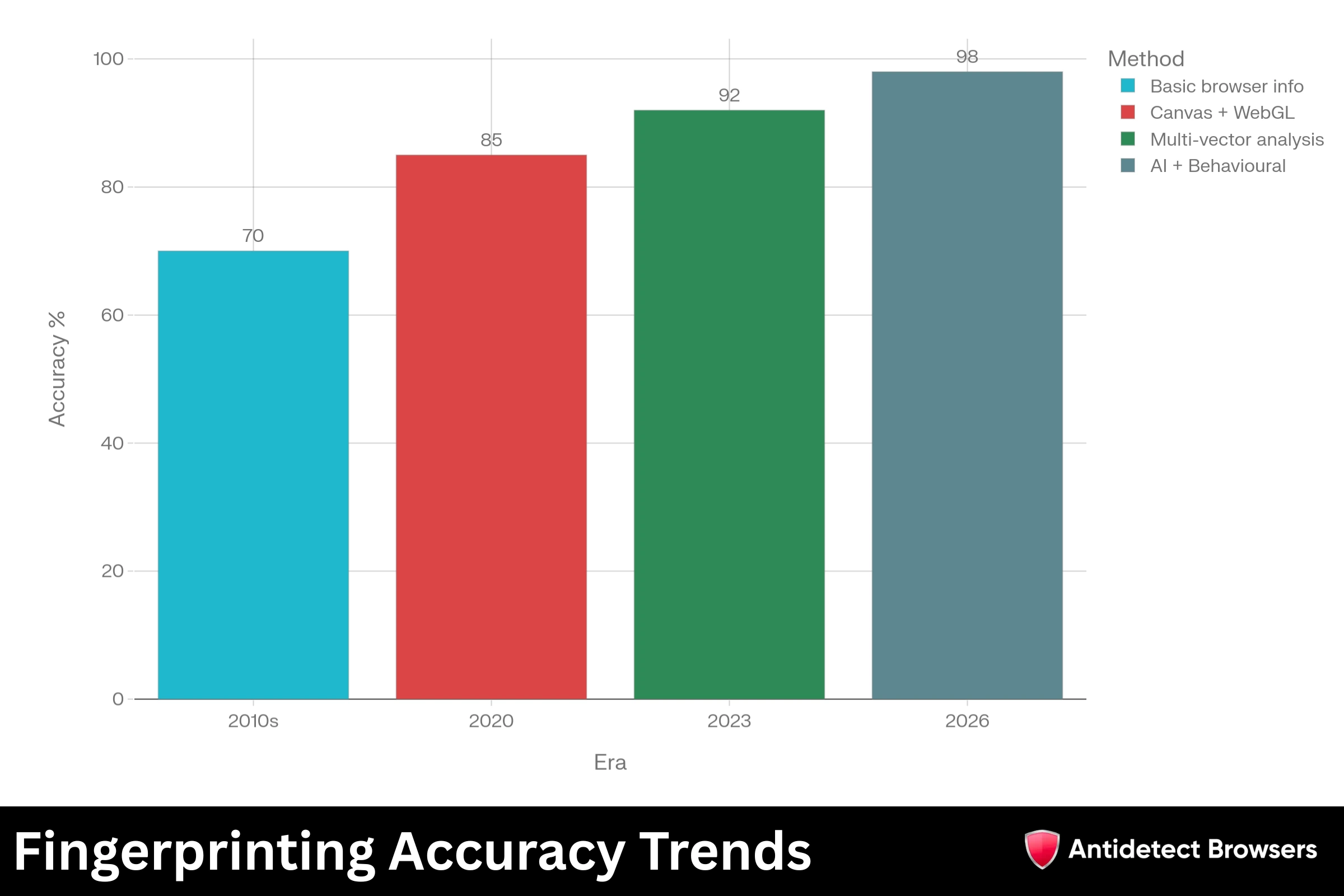
Tracking has grown far more sophisticated. In 2026, platforms no longer rely on a single method. They stack multiple techniques into what security researchers call a super fingerprint or composite digital fingerprint.
| Fingerprinting Era | Primary Method | Accuracy |
|---|---|---|
| 2010s | Basic browser info | 70% |
| 2020 | Canvas + WebGL | 85% |
| 2023 | Multi-vector analysis | 92% |
| 2026 | AI + Behavioural | 98%+ |
Modern tracking combines canvas data with WebGL rendering, audio context processing, font enumeration, and even keystroke dynamics.
AI-powered models now analyse subtle behavioural patterns like mouse movements and scroll speed. A single canvas blocker cannot beat a system that cross-references ten or more signals simultaneously.
Google has also started experimenting with canvas API restrictions in Chrome 142 Canary, blocking pixel data extraction in incognito mode. While promising, it only applies to incognito sessions and does not help affiliate marketers who need persistent, separated profiles.
Why Anti-Detect Browsers Matter for Affiliate Marketers

Affiliate marketing in 2026 demands multi-account management. You run campaigns on Meta, Google, TikTok, and native ad networks at once. Each platform uses advanced fingerprinting systems to detect unusual device patterns, proxy inconsistencies, or multi-account behaviour.
A single account ban can wipe out weeks of testing and thousands of dollars in ad spend. Anti-detect browsers solve several critical problems:
Without an anti-detect browser, running even three accounts on one platform is a gamble. With one, you can safely manage dozens.
How Anti-Detect Browsers Block Canvas Fingerprinting
Regular browsers send raw canvas output to any script that requests it. Anti-detect browsers interrupt that process. But they do not just block canvas data. They replace it with something believable.
Here is how top-tier anti-detect browser technology handles canvas fingerprinting:
Controlled Noise Injection
Instead of blocking canvas calls entirely, anti-detect browsers add slight, consistent noise to pixel data. Each browser profile generates a unique but stable canvas output. Websites see what looks like a real fingerprint from a real device. No red flags are raised.
Synchronised Fingerprint Spoofing
A canvas fingerprint must match other system signals. If a profile claims to run an Intel GPU but produces canvas output typical of an NVIDIA card, detection systems catch that mismatch instantly. Quality anti-detect browsers synchronise every parameter.
Canvas output aligns with reported GPU model, WebGL capabilities match rendering behaviour, and font lists match the claimed operating system. Consistent browser fingerprint generation is what separates reliable tools from cheap alternatives.
Isolated Browser Profiles
Each profile operates in a sandboxed environment. Cookies, cache, canvas output, and session data stay completely separated. Platforms cannot link two profiles even if both run on one machine.
Hardware Parameter Emulation
Advanced anti-detect browsers emulate different screen resolutions, CPU thread counts, audio contexts, and WebRTC configurations per profile. Combined with canvas spoofing, every profile appears as a completely different device to tracking systems.
What Happens When Canvas Spoofing Fails

Poor canvas spoofing is worse than no spoofing at all. When fingerprint data contradicts other browser signals, detection systems flag it immediately. Platforms then blacklist the device fingerprint, the IP range, and sometimes the entire payment method tied to those accounts.
Signs of weak spoofing include:
A quality anti-detect browser for multiple accounts avoids all these issues by maintaining internal consistency across every data point a tracking system checks.
Staying Ahead of Fingerprint Detection in 2026
Browser fingerprinting is now a $2.5 billion industry, projected to reach $7.2 billion by 2033. Platforms invest heavily in AI-driven detection that analyses behavioural patterns alongside traditional fingerprint signals. Browser tampering detection nearly doubled year-over-year in 2025, showing platforms are catching more spoofed sessions than ever before.
For affiliate marketers, a few practices keep accounts safe:
Canvas fingerprinting will not disappear. But with a properly configured anti-detect browser and a disciplined approach to digital identity management, affiliate marketers can operate at scale while keeping accounts fully protected. Investing in reliable tools and maintaining strict profile hygiene is what separates marketers who scale profitably from those who get banned repeatedly.