Affiliate teams often need more than one Instagram profile.
One profile may promote coupons. Another may support a niche product page. A third may test creator content, reels, or lead magnets.
Risk starts when all accounts look linked.
Instagram can collect device identifiers, cookies, and data linked to device settings, so account separation matters for serious social media work. Meta also says users must not create accounts or collect information through automated means without express permission.about.
A safe setup is not about tricks.
It is about clean browser profiles, stable login signals, human-like activity, secure access, and clear records.
For readers of antidetectbrowsers.com, the goal is simple: protect accounts, reduce flags, and keep affiliate funnels alive.
Why Instagram Account Separation Matters in 2026
Instagram does not only check username and password.
It can read signals from IP address, cookies, device data, login pattern, time zone, language, and account actions. If 12 accounts log in from one device with mixed cookies, risk rises fast.
Instagram app users can switch between several accounts without logging out, and many guides report a five-account active login limit inside one mobile app. For affiliate projects above that level, browser separation becomes useful.
An anti-detect browser helps create a private workspace for each profile.
Each workspace can hold separate cookies, cache, local storage, user agent, screen size, time zone, and proxy details. That supports browser fingerprint isolation and keeps one profile from leaking signals into another.
Think of each Instagram profile as a separate shop.
Each shop needs its own key, address, staff log, and daily routine. If every shop uses one key and one door, security teams may see one owner behind all activity.
Build Clean Instagram Browser Profiles
Start with one browser profile for one Instagram account.
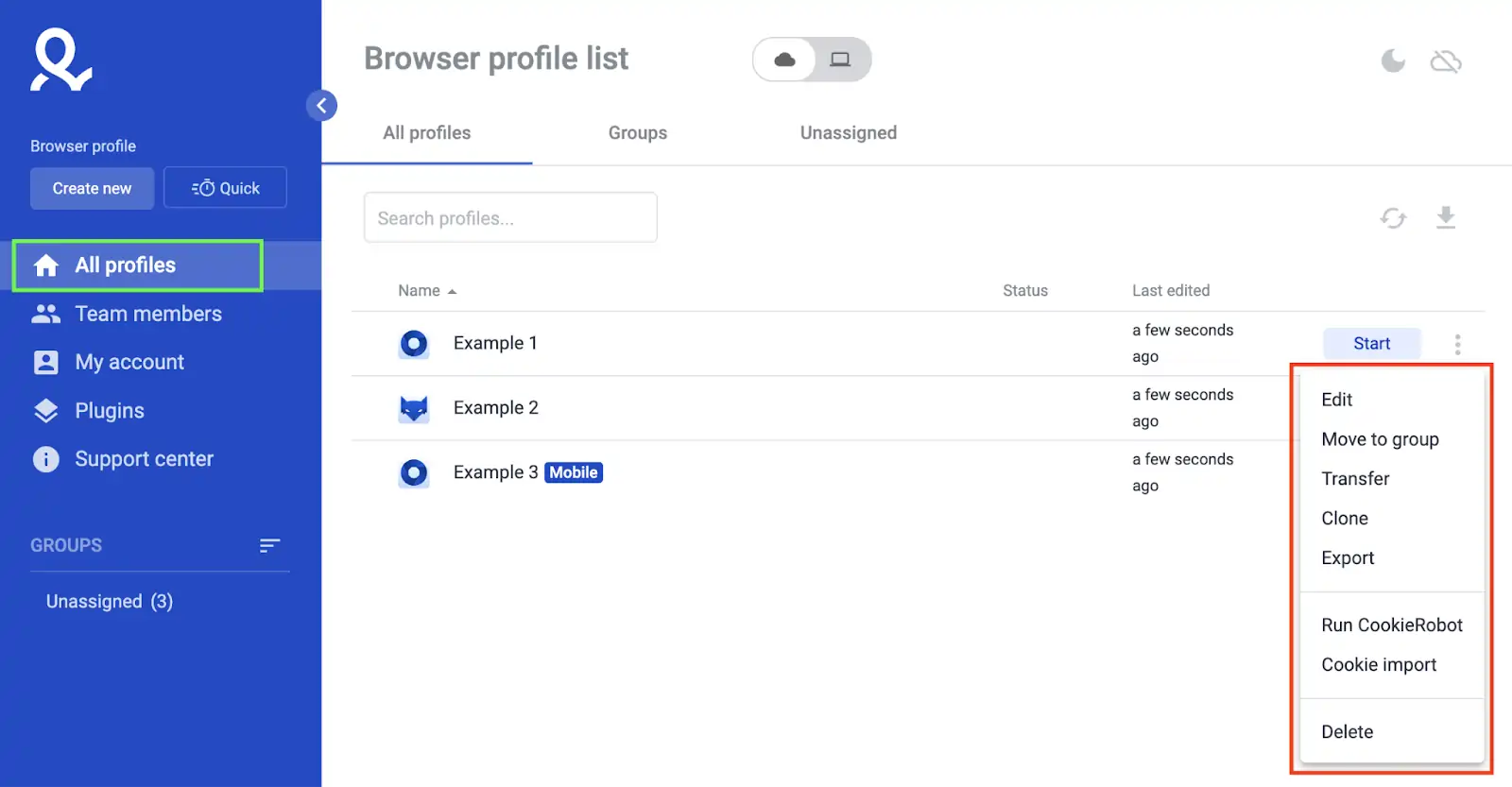
Do not place two Instagram logins inside one browser profile. Mixed cookies and shared sessions create weak account separation.
Use a clear naming format.
Example: IG US Fitness 01, IG UK Beauty 02, IG AU SaaS 03. Add niche, geo, account age, and owner initials.
A neat folder system helps teams work faster.
Use folders such as Coupon Pages, Creator Outreach, Brand Pages, Warm-Up Accounts, and Client Accounts. Keep notes short but useful.
Each anti-detect browser profile should include:
Do not copy a full profile and log in to a fresh Instagram account without edits.
Cloned settings can create similar fingerprints. Each profile should look like a real user setup, not a copied template.
Use a browser fingerprint check before login.
Check IP, WebRTC, DNS, time zone, language, screen size, Canvas, WebGL, and user agent. If the IP says US but the time zone says India, fix it before opening Instagram.
Match Proxies With Instagram Account Location
Proxy quality affects account health.
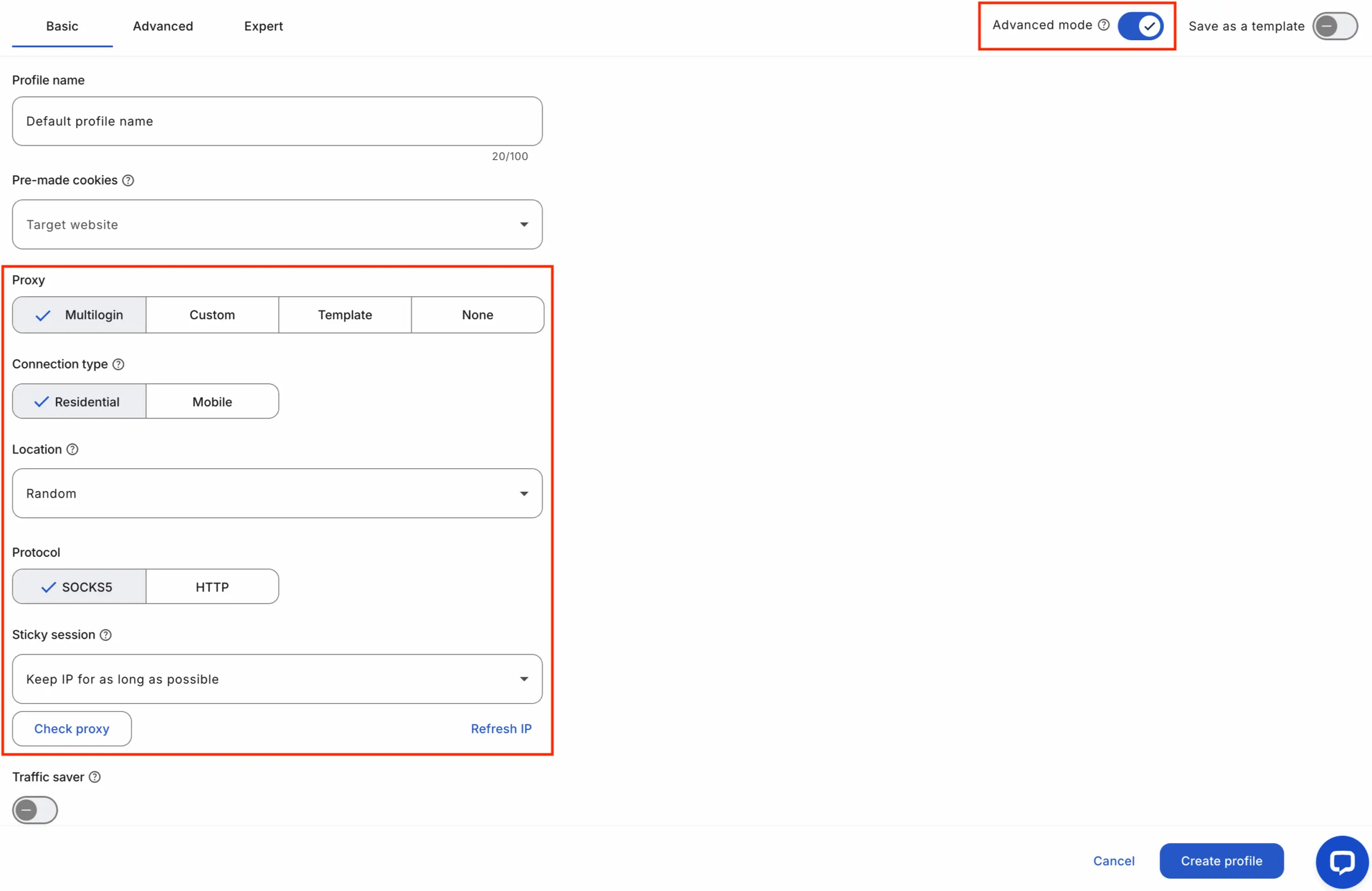
A residential proxy setup usually looks more natural than a cheap shared data centre IP. For Instagram, location consistency matters more than constant IP change.
Use one proxy per account when scale gets serious.
For 10 accounts, use 10 separate proxy paths. Do not rotate every few minutes. Sudden IP jumps can look odd.
Keep geo simple.
If an account targets US coupon traffic, use a US IP, US time zone, English language, and US posting hours. If the account targets UK beauty traffic, use UK IP, UK time zone, and British spelling.
A clean stable IP location helps reduce login checks.
Avoid logging in from India at 9 AM, US at 9:20 AM, then Germany at 9:40 AM. Real users rarely move like that.
Use sticky sessions where possible.
A sticky session keeps IP stable for hours or days. For warm accounts, stable access is safer than fast rotation.
Here is a simple geo match table:
| Account Type | Proxy Geo | Time Zone | Language | Posting Window |
|---|---|---|---|---|
| US coupon page | US | New York or Los Angeles | English US | 8 AM to 10 PM local |
| UK fashion page | UK | London | English UK | 7 AM to 9 PM local |
| Indian tech page | India | Kolkata | English or Hindi | 8 AM to 11 PM local |
| Australia beauty page | AU | Sydney | English AU | 8 AM to 9 PM local |
Keep device signals aligned with proxy geo.
If proxy geo is UK, browser language should not show random mixes every login. Small mismatches happen in real life, but repeated mismatches across many accounts can create risk.
How to Keep Instagram Fingerprints Clean
Fingerprint hygiene means every account gets a believable browser identity.
Focus on unique browser fingerprints instead of random settings. Random does not mean safe.
Use stable values per account.
A normal user does not change screen size, GPU, system fonts, audio data, and time zone every day. Keep each account steady.
Core fingerprint areas to review:
Do not clear cookies after every login.
Cookies help Instagram remember a normal device. A fresh device on every visit may lead to checks.
Use cookie session separation from day one.
Never log in to client accounts, test accounts, and coupon accounts in one profile. One accidental login can link workspaces.
Keep local storage intact.
Local storage can hold session data and account state. Deleting it too often may make each visit look like a new device.
Instagram Account Warm-Up Plan for 2026
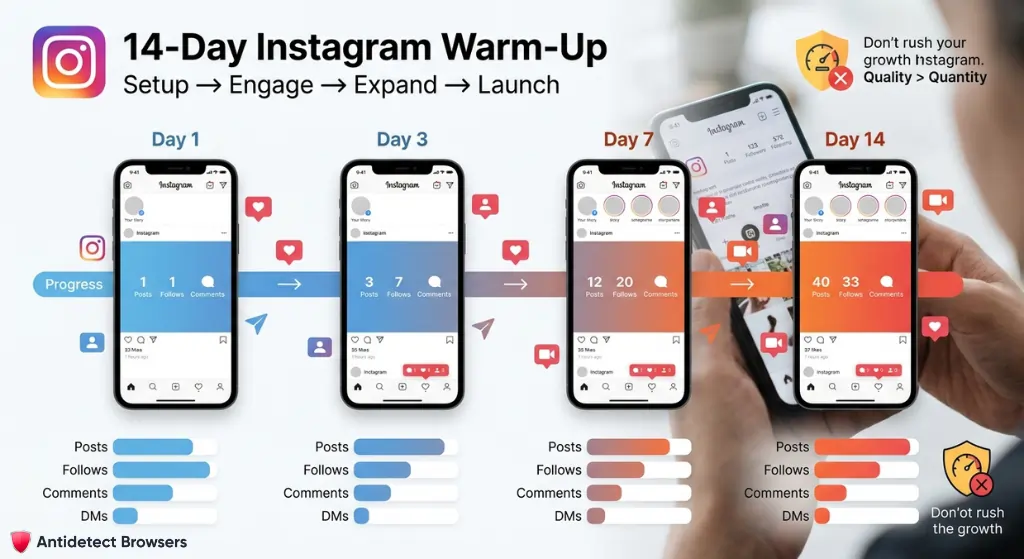
New Instagram profiles need calm activity.
A fresh account that likes 200 posts, follows 80 users, posts 15 reels, and sends 50 DMs in one day looks unsafe. Slow start protects Instagram account safety.
Use a 14-day warm-up plan.
Day 1 to 3 should focus on profile setup, bio, picture, two posts, and a few natural actions. Day 4 to 7 can add light follows, saved posts, story views, and comments.
Day 8 to 14 can add reels, link clicks, replies, and content tests.
Do not push affiliate links too soon. First build a normal profile history.
Sample warm-up pace:
| Age | Posts | Follows | Comments | DMs | Notes |
|---|---|---|---|---|---|
| Day 1 | 1 | 0 to 5 | 0 | 0 | Add photo, bio, link later |
| Day 3 | 1 to 2 | 5 to 10 | 1 to 2 | 0 | Save niche posts |
| Day 7 | 3 to 5 | 10 to 20 | 3 to 5 | 1 to 3 | Add stories |
| Day 14 | 6 to 10 | 20 to 40 | 5 to 10 | 3 to 8 | Start soft CTA |
Numbers are guides, not targets.
Quality matters more than volume. A few real replies beat mass actions.
Keep actions varied.
Watch reels, save posts, reply to comments, edit bio, and post stories. Real users do not only follow and like.
Instagram Login Security for Multiple Accounts
Security is part of the account scale.
Weak passwords and shared access create more harm than fingerprint leaks. Each account should have a unique password stored in a secure vault.
Instagram supports two-factor authentication through Accounts Center, then Password and security, then Two-factor authentication. Use an authentication app where possible, as SMS can fail during travel or SIM issues.
Keep backup codes offline.
Store codes in a secure team vault. Add account name, email, 2FA method, recovery contact, and access owner.
Use two-factor authentication setup for every valuable profile.
Do not wait until an account has revenue. Set it up before the first campaign.
Access should be role based.
A content writer may only need captions. A media buyer may need tracking links. A senior operator may need full login access.
Never share raw passwords in chat.
Use a vault with access logs. Remove access when a freelancer leaves.
Content Rules for Safe Instagram Affiliate Pages
Safe account access means little if content looks spammy.
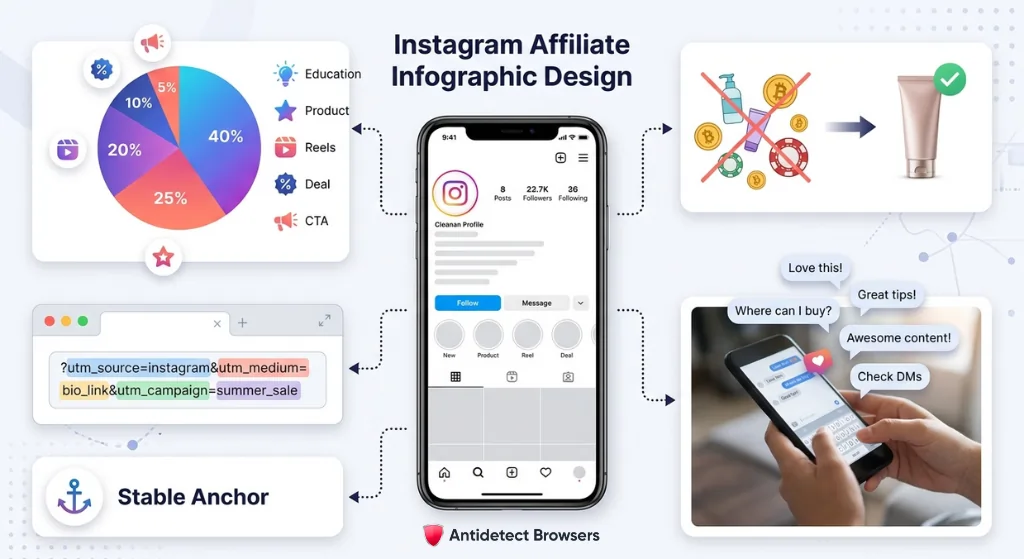
Affiliate pages need clear value before any offer. Add education, product use cases, short reviews, comparison reels, coupon alerts, and buyer questions.
Use one niche per profile.
A page that posts skincare at 9 AM, crypto at noon, and casino offers at night lacks trust. Niche focus helps users and platform signals.
For affiliate campaign tracking, use neat link paths.
Use UTM tags for source, account, post type, and campaign.
Example: utm_source=instagram&utm_medium=bio&utm_campaign=uk_beauty_may.
Do not change bio links too often.
Frequent link swaps can look noisy. Use a stable bridge page when testing offers.
Good content mix for affiliate pages:
Add real comments and replies.
Do not post and vanish. Answer questions, thank users, and pin helpful replies.
Stay Inside Rules
Affiliate growth should not depend on unsafe bots.
Meta terms restrict automated account creation and automated data access without permission. Meta’s terms also say users may not access or collect data from products through automated means without prior permission.
Avoid mass follow, mass like, mass comment, mass DM, scraping, fake engagement, and cloned comments.
Those actions may bring short bursts, but account loss can kill a campaign overnight.
Use official paths for scale.
Meta’s Instagram Graph API supports publishing for Business and Creator accounts when required permissions and connected Facebook Pages are in place. That route is better for approved scheduling, content posting, and analytics workflows.
Keep Instagram automation rules simple.
Use tools for planning, reminders, approved posting, asset storage, and reporting. Avoid tools that ask for unsafe login access or promise fake growth.
A safe affiliate stack includes:
Do not automate trust.
Trust comes from steady content, clear offers, real replies, and clean access.
Safe Daily Routine for Multiple Instagram Profiles
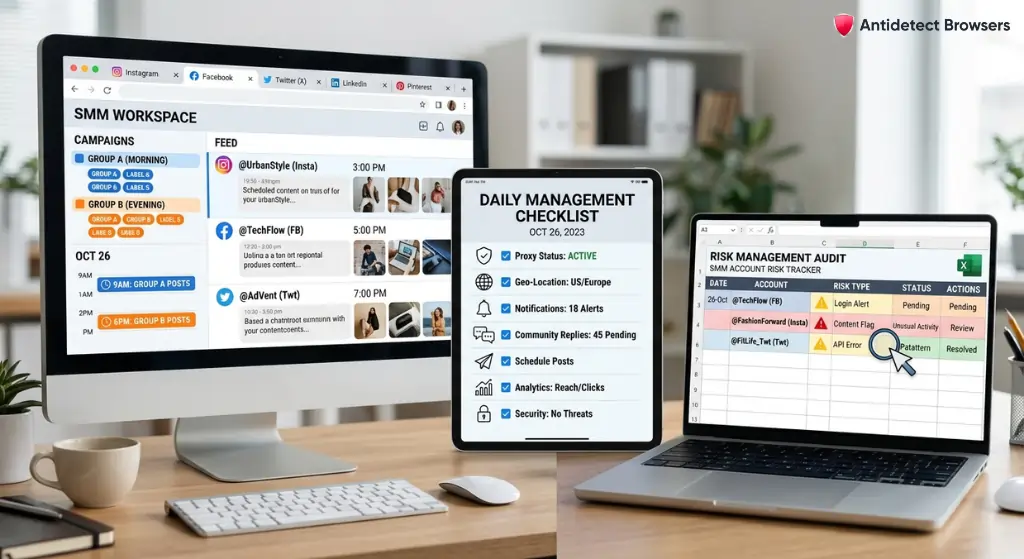
A good workflow keeps teams calm.
Open only needed profiles for that work block. Close profiles after posting, replying, or checking stats.
Use short work blocks.
Example: 10 accounts can be split into two groups of five. Group A gets morning checks. Group B gets evening checks.
Daily checklist:
Do not jump across profiles too fast.
A human operator needs time to read, click, type, and review. Add natural gaps between actions.
Keep a risk log.
Record login checks, email codes, 2FA prompts, locked sessions, proxy drops, and content removal notices. Patterns will show weak points.
Risk log example:
| Date | Account | Signal | Likely Cause | Action |
|---|---|---|---|---|
| 5 May | IG US Fitness 01 | Email code | New proxy | Kept same IP after login |
| 5 May | IG UK Beauty 02 | Logout | Cookie clear | Restored profile backup |
| 6 May | IG SaaS 03 | Low reach | Link spam | Reduced CTA posts |
A log helps spot account stress before suspension.
If three accounts show checks after proxy change, proxy quality may be issued. If only one account shows checks after heavy DMs, activity patterns may be issued.
Example Setup for 10 Instagram Affiliate Accounts
Here is a practical setup for an affiliate team.
Goal: 10 Instagram accounts across beauty, fitness, SaaS, and coupons. Each account has one niche, one geo, one browser profile, one proxy, and one content plan.
Account structure:
| Profile | Niche | Geo | Content Goal | Daily Actions |
|---|---|---|---|---|
| IG 01 | Beauty coupons | UK | Voucher posts | 1 post, 5 replies |
| IG 02 | Beauty reviews | UK | Short reels | 1 reel, 5 saves |
| IG 03 | Fitness deals | US | Product clips | 1 post, 8 replies |
| IG 04 | Fitness tips | US | Workout reels | 1 reel, 10 likes |
| IG 05 | SaaS tools | US | Carousel tips | 1 carousel |
| IG 06 | AI tools | US | Demo reels | 1 reel |
| IG 07 | Home gadgets | AU | Product proof | 1 post |
| IG 08 | Coupon alerts | IN | Story deals | 3 stories |
| IG 09 | Creator collab | US | Outreach | 3 manual DMs |
| IG 10 | Test page | UK | Hook tests | 2 story polls |
No profile shares cookies.
No profile shares proxy. No profile gets mass actions.
A team can assign two people.
Person A handles content on profiles 1 to 5. Person B handles profiles 6 to 10. Each person uses shared SOP, but not shared passwords.
Use a weekly review.
Check reach, saves, clicks, follower quality, and account alerts. Kill weak content ideas, not accounts.
Final Action Plan
Start with a clean sheet. List every Instagram page, owner, email, browser profile, region, 2FA status, and content goal.
Next, create one profile per account. Match IP region, time zone, language, and account niche.
Add unique login credentials and 2FA before any growth work. Store recovery codes safely.
Build a 30 day content calendar. Mix reels, carousels, stories, and soft affiliate prompts.
Use official publishing routes when possible, as Instagram Graph API access supports Business and Creator accounts with approved permissions. Use anti-detect browser profiles for clean session control, not policy dodging.
For antidetectbrowsers.com readers, the best result comes from simple discipline: one account, one profile, one stable region, one clear content plan. That is how affiliate teams keep Instagram assets safer while building traffic with less chaos.