Lose a warmed TikTok Ads Manager account at 2am and you feel it in your wallet by breakfast. One shared cookie, one repeated device signal, and a whole cluster of ad accounts goes dark together. 😮💨
So here is the short answer up front: to safely operate multiple TikTok accounts for paid traffic in 2026, you pair a proper antidetect browser for TikTok with clean mobile or residential proxies, and you give every account its own isolated fingerprint. That combo is what keeps ad spend flowing instead of stalling on a checkpoint.
At AntidetectBrowsers.com we have poked, benchmarked and occasionally rage tested these tools since 2022, and our team has been in the affiliate and media buying trenches for 7+ years. We have burned accounts so you do not have to.
Below are antidetect browsers we keep coming back to for TikTok ad work, each scored on how well it holds up when the real budget is on the line. Grab a coffee, because this one is a proper guide.
Why TikTok Ad Accounts Get Flagged or Restricted
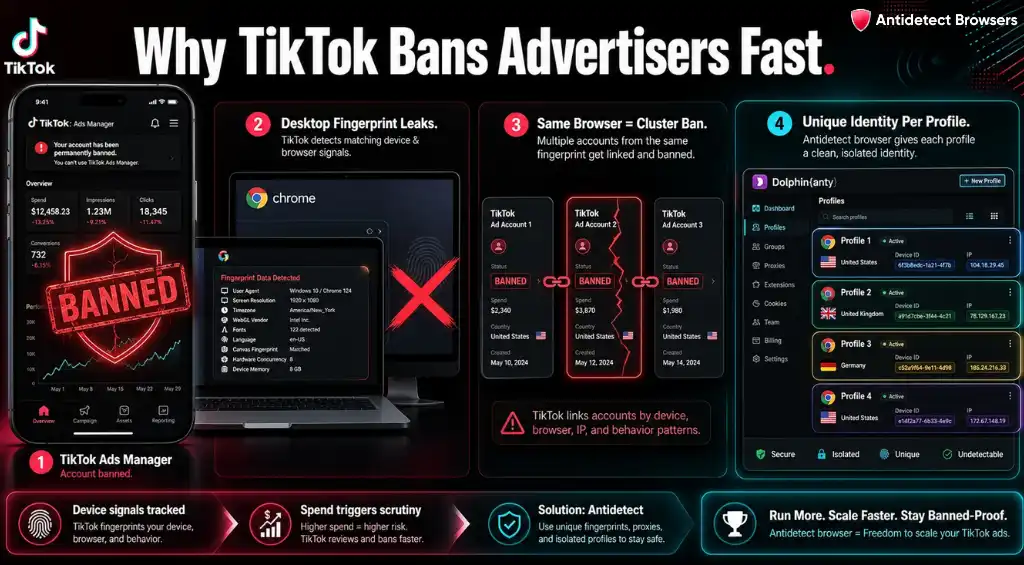
TikTok treats a content account and an ad account very differently. A creator profile gets judged on engagement. An ad account gets treated like a business entity, tied to a TikTok Business Center, a payment method, a domain and a spend history. Money is involved, so scrutiny climbs.
Because of that, TikTok watches device signals, location consistency and long session history closely. When several ad accounts touch the same browser or the same device farm, the platform links them. Then bans cascade across the cluster.
Desktop-only access is a common trigger too. TikTok expects mobile behaviour, so a plain Chrome window with a swapped user agent still leaks desktop hardware underneath.
That mismatch invites extra reviews, spend caps and sudden restrictions, even when campaigns follow policy to the letter. An antidetect browser for TikTok closes that gap by handing each profile its own unique digital identity.
What Makes an Antidetect Browser Good for TikTok Ads?
Plenty of tools isolate accounts on the desktop. Fewer handle the mobile side that TikTok cares about most. So we look past the marketing and check the signals that get advertisers flagged.
Get those five right and TikTok sees separate humans on separate phones, exactly the illusion you need for creative testing at scale.

Our Methodology Behind Picking these Browsers for TikTok Ad Work
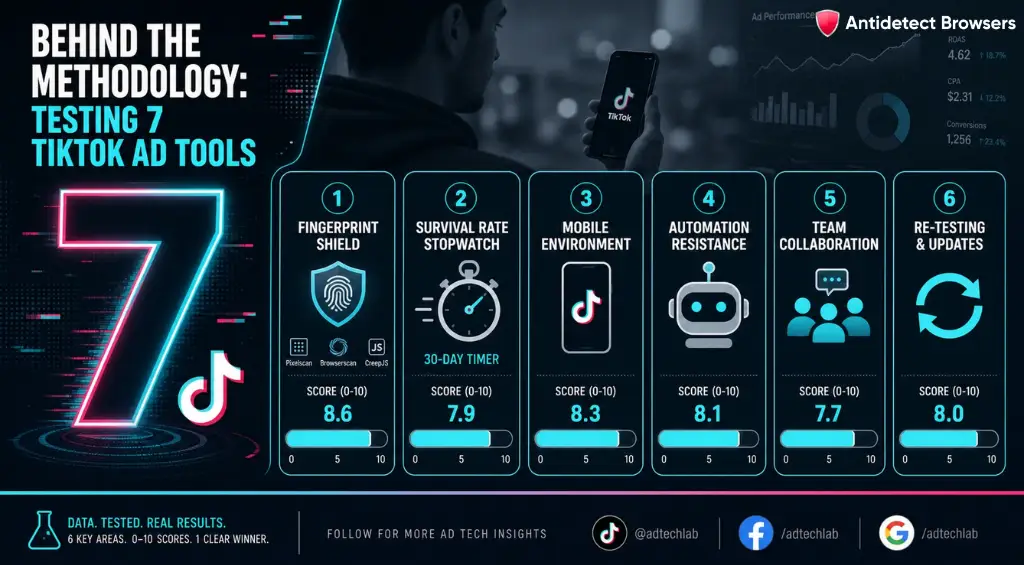
No vendor paid for a spot here, and none got early sight of results. Our scoring mirrors the same six weighted checks we use across the site.
Then we re-test after major updates. Scores below are out of 10, and yes, each tool earns a genuinely different mark. Order follows a simple sequence, not a ranking. Let us get into it. 🚀
Top 7 Antidetect Browsers for TikTok Ads
Here is the honest side-by-side. Match the row to how your traffic actually flows, mobile app, desktop Ads Manager, or both. 👇
| Tool | Score | Engine / core | Native TikTok mobile | Automation | Standout for TikTok ads |
|---|---|---|---|---|---|
| Multilogin | 9.7 | Mimic + Stealthfox | ✅ Cloud Phone | API + scripts | Hybrid mobile + desktop, proxies included |
| GoLogin | 8.8 | Orbita (Chromium) | ⚠️ Mobile emulation | API 1,200 rpm | Low-cost entry, proxies bundled |
| AdsPower | 9.0 | Sun + Flower | ⚠️ iOS/Android emulation | No-code RPA | Bulk ad rosters, 1,000 profile import |
| Incogniton | 8.2 | Chromium | ❌ Desktop only | Synchronizer + API | Verify fingerprint before you spend |
| Dolphin Anty | 9.4 | Chromium | ⚠️ + Cloud phone add-on | Sync + Scenario Builder | TikTok ad uploads + real fingerprints |
| Undetectable | 8.5 | Chromium | ⚠️ Android/iOS configs | Cookies Bot + API | Uptime at scale, geo warming |
| GeeLark | 9.3 | Android OS cloud | ✅ Real cloud phone | TikTok RPA templates | Native app, no emulator footprint |
1. Multilogin — the enterprise pick when a TikTok ban would really sting
Multilogin sits at the top of most serious ad teams toolkits, and for TikTok it earns that seat twice over. Two engines, Mimic on Chromium and Stealthfox on Firefox, keep every fingerprint vector aligned so profiles never look half built. That consistency is what survives TikTok's fussier checks.
Where it pulls ahead for this topic is the built-in Cloud Phone for TikTok. You launch real Android instances, install the native TikTok app, and post or engage from what looks like a genuine handset with its own IMEI and GPS. Desktop browser profiles handle the Ads Manager and reporting side, all from one dashboard.
For hybrid TikTok setups where mobile trust and desktop control both matter, few tools feel this complete.
Best paired with mobile proxies · hybrid cloud phone + browser workflow
2. GoLogin — the value play for solo buyers scaling TikTok slowly
GoLogin has protected more than 5 million profiles, and its Orbita engine, a custom Chromium fork, spoofs over 50 fingerprint parameters per profile. For an advertiser easing into multiple TikTok accounts, that low friction matters. Profiles spin up in seconds, and 2GB of residential proxy traffic ships with paid tiers so you are not stuck sourcing IPs on day one.
Its trick for TikTok is the mobile browser profile. GoLogin emulates mobile hardware signatures on your desktop, matching resolutions and pixel densities of popular phones, which suits ad-side tasks and TikTok Web access without a separate phone farm.
Scaling into the hundreds shows its limits, yet for careful, cost-aware growth it holds up nicely.
Best for solo affiliates · mobile profile emulation for TikTok Web
3. AdsPower — built for high volume TikTok ad operations
AdsPower is the workhorse when your TikTok ad accounts number in the dozens or hundreds. With 9 million users across 200+ countries and dual engines, SunBrowser on Chromium and FlowerBrowser on Firefox, it chews through bulk work that would choke lighter tools. You can import up to 1,000 fully fingerprinted profiles from a single Excel file, then assign proxies in a batch.
For TikTok specifically, its no-code RPA studio is the draw. Media buyers use it to warm accounts, check ad permissions, and repeat routine ad-side actions across many profiles at once, without writing a line of code. The Multi-Window Synchronizer mirrors one action across every open profile.
Bring your own proxies and it becomes a genuine command centre for large TikTok ad rosters.
Best for bulk ad accounts · built-in RPA + synchronizer
4. Incogniton — the friendly on-ramp for first TikTok ad profiles
Incogniton, out of the Netherlands, keeps things approachable for advertisers still finding their feet with account isolation. Every profile carries its own Canvas, WebGL, audio and font fingerprint, with no data bleed between them, so a new buyer can separate a handful of TikTok ad identities without deep technical setup.
Its standout for ad work is the built-in verification. Profiles plug straight into BrowserLeaks, Pixelscan and BrowserScan, so you can confirm fingerprint spoofing health before pointing a profile at a live ad account. The Cookie Collector and paste-as-human typing add realism during warm-ups.
One honest caveat: mobile fingerprint simulation is thin here, so treat it as a desktop-side ad tool and pair it with a mobile solution for native TikTok posting.
Best for beginners · desktop ad-side isolation
5. Dolphin Anty — the affiliate favourite for TikTok media buying
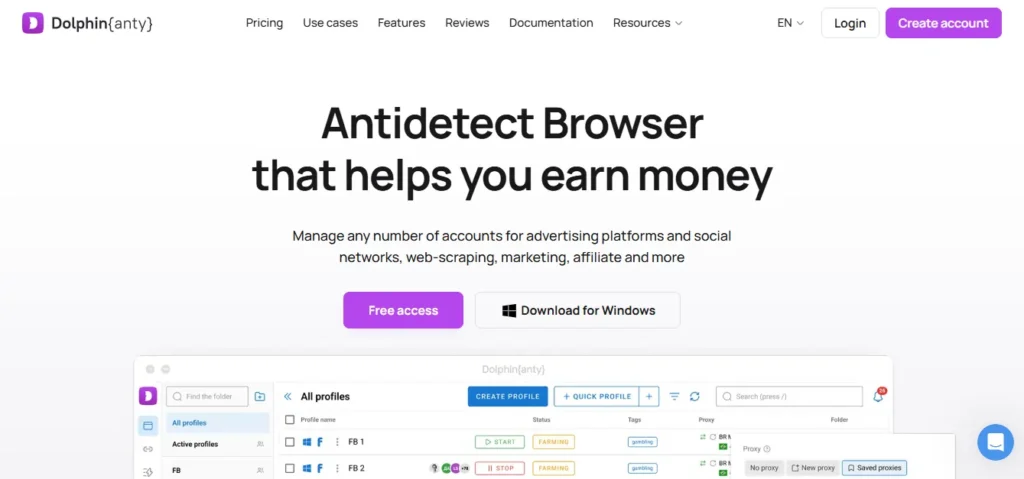
Dolphin Anty was built by affiliates for affiliates, and it shows the moment you open it. With 860K+ users, its profiles draw from a database of real device fingerprints rather than synthetic guesses, which reads far more naturally to TikTok's checks. For traffic teams pushing offers, that authenticity is the whole game.
What lifts it for this topic is dedicated TikTok tooling. Dolphin ships automated ad uploads for TikTok, encrypted auto-login for TikTok accounts, and a Synchronizer that repeats a master profile's actions across many others. So warming, posting and ad launches move in parallel instead of one weary click at a time.
If TikTok and paid traffic are your daily bread, this one feels purpose built.
Best for affiliates + media buyers · TikTok ad automation baked in
6. Undetectable — the stability pick for big TikTok profile rosters
Undetectable earns its name through sheer reliability. Tuned to handle 5,000+ profiles with 99.99% uptime across three years, it suits advertisers who need a wide bench of TikTok identities that simply stay up. Profiles pull from a fingerprint configuration store built on real devices, including Android and iOS signatures for mobile-flavoured ad work.
Its edge for TikTok warming is the Cookies Bot tied to a Popular Sites Generator. Pick a geo, and the bot browses geo-relevant sites automatically, building believable history before an ad account goes live. Storage can sit locally, in the cloud, or on your own server, which privacy-minded teams appreciate.
No proxy pool is included, so plan on wiring in your own mobile or residential IPs.
Best for scale + uptime · geo-aware warming engine
7. GeeLark — the mobile native answer TikTok respects most
GeeLark is not a browser at all, and that is exactly the point. It gives you real Android cloud phones, full ARM-based devices in the cloud, each with a randomised IMEI, MAC address and OS. Since TikTok detection leans mobile, the native app on a genuine cloud handset sidesteps the app-layer checks that trip desktop tools.
For TikTok ad and growth teams, its automation is the sweet spot. Pre-built RPA templates cover TikTok logins, posting, liking and commenting, while a Synchronizer mirrors actions across many phones. GeeLark AI even helps generate and repurpose short-video content, then schedule it across accounts.
Blend it with a desktop browser for the Ads Manager and you cover both halves of TikTok cleanly.
Best for native TikTok mobile · phone farm without the hardware
Pairing the Right Proxies with Each TikTok profile
A browser handles the fingerprint. A proxy handles the IP. TikTok checks both, so one without the other leaves a gap. That is the single mistake we see sink new advertisers.
For TikTok, proxy quality outranks nearly everything. Because the platform is mobile first, mobile proxies for TikTok on 4G or 5G lines carry the highest trust, since they route through real carrier networks. Residential IPs come next and suit desktop Ads Manager work well.
Quick rule we live by: mobile proxies for native app posting, residential proxies for the desktop ad side, and never reuse one IP pool across an entire account cluster. Keep the proxy geo matched to the profile timezone, always.
Datacenter IPs? Fine for low-stakes tasks, risky for anything carrying spend. So skip them for live ad accounts.
One more thing worth saying plainly: even the strongest antidetect browser for TikTok cannot rescue a dirty IP. If a proxy has been abused before, TikTok already distrusts it, and a perfect fingerprint on a burnt IP still trips checks. So vet proxy quality first, test each one inside the browser for WebRTC leaks and correct geolocation, and only then point a warmed profile at your ad account.
How to Manage TikTok Ad Accounts Without Linking Profiles
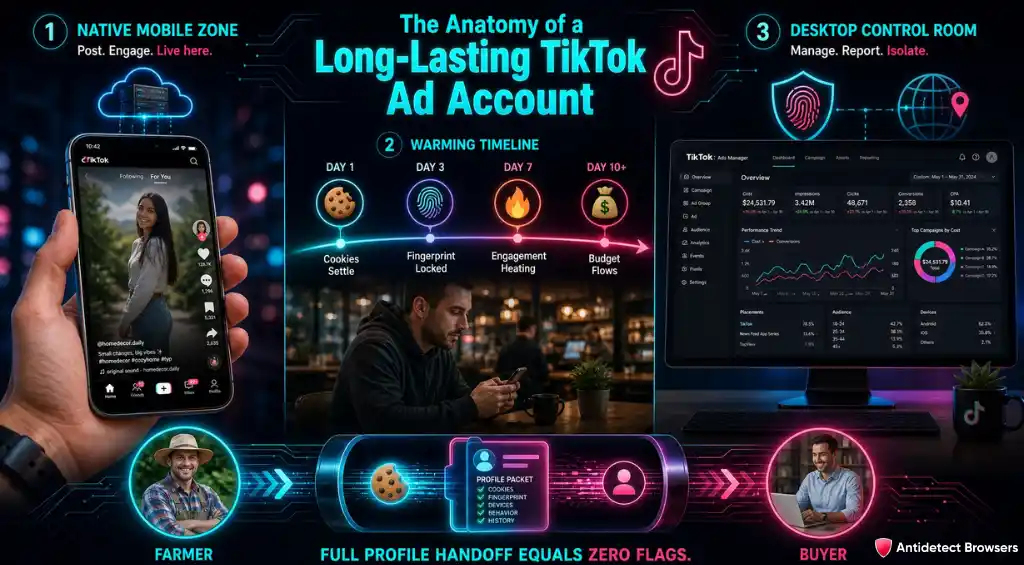
After years of testing across our network, one pattern repeats. The accounts that survive longest are not the ones with the fanciest browser alone. They are the ones warmed patiently, isolated properly, and split across the right environment for each job.
So the setup we lean on looks like this. Native mobile actions, posting and early engagement, live on an Android cloud phone or a cloud-phone browser. Desktop tasks, the TikTok Ads Manager, reporting and creative uploads, run in isolated browser profiles. Both stay tied to consistent fingerprints and their own IPs.
Then comes warming. A fresh profile that jumps straight into ad spend screams automation. Build a few days of natural browsing first, let cookies settle, and let the account look lived in before budget flows.
Handoffs matter too. When a farmer preps an account and passes the full profile, fingerprint and cookies included, to a buyer, TikTok never sees the switch. That single habit prevents a huge share of avoidable restrictions. It is exactly why we keep testing these tools and publishing what holds up, so your TikTok ad spend lands on results, not recovery.
Final Verdict: Build a More Reliable TikTok Ads Setup
Running multiple TikTok accounts successfully comes down to consistency, not shortcuts. A reliable antidetect browser for TikTok, paired with clean mobile or residential proxies, isolated browser profiles, realistic account warming, and stable digital fingerprints can reduce avoidable account issues.
For serious TikTok advertisers and media buyers, choosing the right setup helps protect TikTok Ads Manager workflows, streamline campaign management, and keep paid traffic operations organised as ad activity scales efficiently.