Sneaker drops do not fail politely. One odd timezone, a recycled browser fingerprint, or a stale login can turn release morning into a queue loop, a payment check, or an account review.
Quick answer: Dolphin Anty is our top pick for sneaker copping beginners in 2026. Profile creation feels quick, proxy checks sit close to daily work, and Scenarios can remove dull prep jobs. Multilogin comes next when browser sessions and Android cloud phones must live in one workspace. GoLogin offers easy cloud access, Octo Browser gives sharp Chromium control, and AdsPower carries the broadest set of process tools.
We tested each choice through a sneaker focused lens, not a generic feature sheet. Our checks covered sneaker copping browser profiles, proxy pairing, cookie storage, fingerprint consistency, core freshness, account notes, cloud access, and release day speed.
Important: an antidetect browser does not grant permission to break retailer rules. Nike limits SNKRS entries to one per person for each launch product and actively removes bot activity. Use profile isolation for authorised accounts, privacy, testing, team access, or permitted buying activity. Do not use any tool to defeat purchase limits, queues, CAPTCHAs, or retailer controls.
Why Sneaker Browser Setups Break Before Checkout
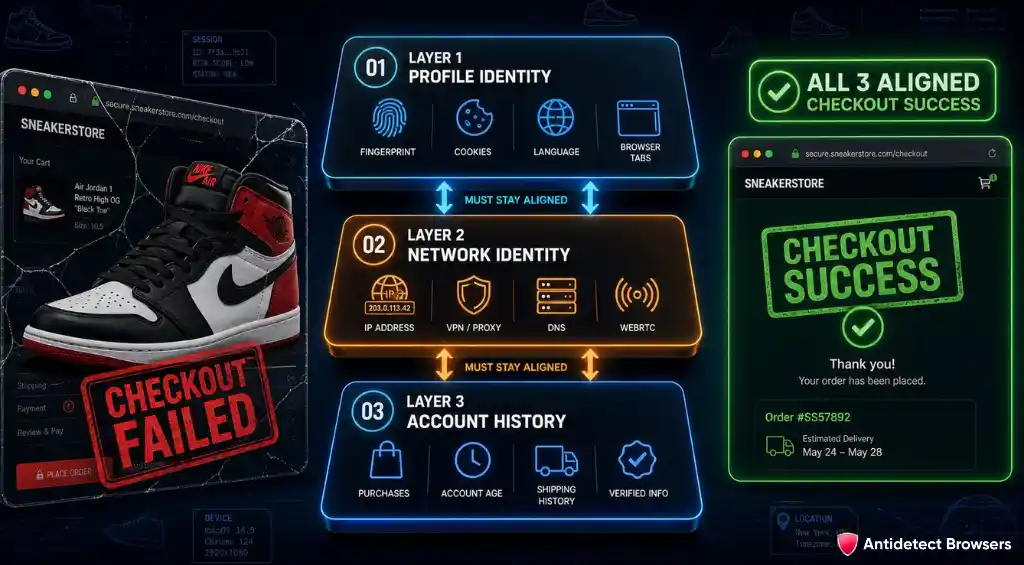
A proxy gets the most attention because an IP is easy to see. Yet sneaker shops read far more than an address. Browser version, screen size, WebGL data, fonts, language, timezone, WebRTC, cookies, storage, and Client Hints can all form one device identity.
A clean release day browser setup needs every signal to tell one believable story. A London IP paired with a US timezone looks careless. A Windows user agent tied to Mac only fonts looks odd. Five accounts opening from one IP can look worse. Constantly changing a saved profile can also damage trust because an old account suddenly appears to own a new device.
Three layers must stay aligned
That is why private mode and a VPN are not equal to browser profile isolation. Private mode clears local data after a session. A VPN changes a network route. Neither creates a separate, persistent browser identity for each authorised account.
Release pressure makes small faults louder. Sites face huge traffic spikes, stock disappears quickly, and fraud systems become stricter. A browser that takes ten minutes to organise may feel acceptable on Tuesday. At drop time, those ten minutes are painful.
Why Trust AntidetectBrowsers on Sneaker Copping Tools
AntidetectBrowsers exists for people who use browser profiles in real work. Affiliates, ecommerce teams, agencies, sellers, privacy professionals, and technical operators need plain answers. A long feature dump does not help when a profile refuses to open five minutes before a launch.
We do not score tools from homepages alone. Our hands on checklist starts with a fresh install and ends with repeat sessions. Each browser gets judged on profile setup, fingerprint defaults, proxy checks, cookie handling, saved logins, browser updates, cloud sync, notes, folders, team controls, and the amount of friction felt during ordinary work.
For sneaker use, we added several practical tests:
Current 2026 builds were checked against that method. Marketing claims were treated as claims. Useful controls earned credit only when they made sense for a real sneaker copping workflow.

Top Antidetect Browsers for Sneaker Copping: Quick Comparison
| Antiedetect Browser | 2026 product signal | Workflow character | Main friction |
|---|---|---|---|
| Dolphin Anty | Scenarios and profile synchroniser remain active parts of current product work | Fast, visual, affiliate led | No native Android cloud phone inside the same product |
| Multilogin | Mimic received new cores in 2026 and Android cloud phones gained stronger controls | Strict, broad, business grade | More setup depth than a small manual operation needs |
| GoLogin | Orbita, web access, cloud browser work, and Android updates remain active | Accessible from almost anywhere | Chromium only browser choice |
| Octo Browser | Octo 3.0 added folders and revised profile organisation in July 2026 | Precise, quick, technical | Less visual help for repetitive tasks |
| AdsPower | June 2026 added Chrome 149, Firefox 150, network diagnostics, and richer proxy controls | Tool rich, process heavy | Busy interface takes time to learn |
Scores reflect sneaker copping use, not a universal order for every job. A tool can score lower here and still be excellent for social media, ad accounts, QA, scraping, or ecommerce operations.
1. Dolphin Anty: Our Top Pick for Sneaker Copping Beginners
AntidetectBrowsers score
Dolphin Anty grew from affiliate and media buying work, and that origin still shows. Browser profiles sit in a clear table. Tags, notes, proxies, status fields, and account data stay close together. New users can understand where everything lives without studying a thick manual first.
More than 860,000 users and over 2,200 teams are active on Dolphin Anty each day. Big user numbers do not guarantee checkout success, but they do show a mature product with constant feedback from people who depend on separated browser sessions.
For sneakers, Dolphin feels practical because it treats each profile like a working record, not a blank browser window. A profile can hold one authorised retailer account, its cookies, delivery region, proxy, size notes, and drop label. Close it correctly, reopen it later, and the same persistent browser session remains available.
Sneaker copping signals we liked
Dolphin’s default fingerprint approach matters more than its long settings menu. Beginners often cause problems by changing too many values. Good defaults reduce that temptation. A believable profile should look ordinary, not perfectly hidden.
Unique perk: Dolphin combines a visual Scenario builder with a profile synchroniser. That pairing can reduce repetitive preparation across permitted test profiles without demanding code.
AntidetectBrowsers Verdict: Dolphin Anty gets our sneaker copping vote because setup feels direct. A beginner can prepare profiles, test proxies, retain cookies, and organise several drops without fighting menus. Scenarios add useful speed later, yet basic profile work stays friendly from day one. Keep automation within retailer rules and Dolphin becomes a strong release day command centre.
2. Multilogin: Serious Browser Control With Android Cloud Phones
AntidetectBrowsers score
Multilogin was founded in 2015 and helped shape today’s antidetect browser category. That history is visible in how carefully profiles, proxies, cookies, team access, and browser cores fit together. Nothing feels thrown in merely to fill a comparison chart.
A major 2026 point needs to be clear. Mimic is the current Chrome based core and remains actively supported. Stealthfox is now a legacy Firefox option, with no new cores or fixes planned. Old reviews that present both engines as equal are out of date.
For sneaker work, Multilogin earns attention through its mix of browser profiles and Android cloud phones. Web based releases can stay inside Mimic. App centred work can use cloud phone profiles with device brand, device model, proxy templates, folders, tags, cloning, and transfers. That does not make retailer rules disappear. It simply keeps web and Android operations organised in one account.
Release day controls that matter
Multilogin’s greatest strength is consistency. Browser identity, proxy data, cookies, storage, and team rights feel like parts of one product. That matters during a high demand release because small mismatches can cause extra verification before stock is gone.
Unique perk: Multilogin offers the strongest combined browser and Android cloud phone package in our five picks. Device brand and model controls add useful order to mobile account work.
AntidetectBrowsers Verdict: Multilogin is the polished choice when sneaker work spans normal websites and Android apps. Mimic feels current, profile storage is flexible, and mobile controls are far ahead of a basic emulator. New users need more patience than Dolphin asks for, but disciplined operators gain a very complete workspace.
3. GoLogin: Cloud Access That Keeps Profiles Close
AntidetectBrowsers score
GoLogin was established in 2019 and says more than one million people have used its platform. Orbita, its Chromium based browser, remains central to the product. A desktop app, web app, cloud browser, and Android app give several ways to reach saved profiles.
That access is useful when release prep does not happen from one desk. A profile can be checked from a laptop, opened through web access, or reviewed from Android. Recent 2026 Android work added a revised profile table, folders, notes, screen resolution controls, and a warning when a profile starts without a proxy.
GoLogin also takes a sensible default position on fingerprint settings. GoLogin recommends leaving most values alone and choosing a suitable proxy. That is sound advice for sneaker accounts. Over edited fingerprints often look less natural than generated defaults.
Useful controls for a calmer drop morning
GoLogin feels less strict than Multilogin and less process heavy than AdsPower. That middle ground works well for people who value reach and low friction. Orbita does not offer a Firefox core, yet most sneaker shops are heavily tested against Chromium browsers, so that limit may not hurt a normal web drop.
Unique perk: GoLogin’s cloud browser can open a stored profile through web access. A saved session is not chained to one computer, which can be handy during travel or hardware trouble.
AntidetectBrowsers Verdict: GoLogin is a strong middle option. Setup is clear, location matching is sensible, and cloud access can rescue a session when the main computer is unavailable. Its sneaker value comes from convenience and consistency, not flashy automation. Leave fingerprints near default, pair each approved account with stable network data, and Orbita stays pleasantly easy to use.
4. Octo Browser: Fast Chromium Updates and Fine Fingerprint Control
AntidetectBrowsers score
Octo Browser’s public client history reaches back to 2021, and the service is operated by a UK company. Its product identity is simple: a Chromium based antidetect browser with close fingerprint control, fast core updates, cloud profile work, team rights, and API access.
Octo 3.0 arrived in 2026 with a revised interface and profile folders. Folders matter more than they sound. One tab can hold raffles, another can hold first come releases, and another can hold approved regional shop accounts. Access rights can be attached to each folder when a team shares work.
Octo says browser cores normally follow new Chromium releases within days. Fresh cores can reduce odd version gaps on shops that expect a recent Chrome build. The browser also exposes more than 50 fingerprint parameters, though normal users should not edit values without a clear reason.
Controls that help on limited stock releases
Octo feels sharp rather than friendly. Controls are clean, but the browser expects a user to know why timezone, WebRTC, Canvas, WebGL, screen size, and hardware values must agree. That is good for careful operators. A total newcomer may prefer Dolphin’s more visual approach.
Unique perk: Octo pairs fast Chromium core work with detailed fingerprint settings and encrypted profile passwords. Few tools make technical control feel as tidy.
AntidetectBrowsers Verdict: Octo Browser rewards careful setup. Core freshness, profile folders, encrypted storage, and precise controls make it feel dependable for technical sneaker operations. It is not our first recommendation for someone opening an antidetect browser for the first time. After basic fingerprint knowledge is in place, Octo becomes quick, clean, and very capable.
5. AdsPower: Two Browser Cores and Strong Process Tools
AntidetectBrowsers score
AdsPower takes a broad product approach. SunBrowser is built on Chrome. FlowerBrowser is built on Firefox. Profiles, proxies, cookies, team permissions, RPA, API access, a synchroniser, and developer tools all sit inside one platform.
Its 2026 release pace has been active. June support reached Chrome 149 and Firefox 150. Firefox profiles gained Linux support. Network Diagnostics moved into the main navigation, proxy recognition improved, and profile remarks grew to 2,000 characters. Those changes are useful for sneaker work because network faults and poor notes often cause more pain than an exotic fingerprint option.
AdsPower can keep a large release calendar organised. Long remarks can store retailer rules, region, size, delivery name, account status, and last sign in date. Tags and filters can narrow a large profile table quickly. Built in network checks can confirm outbound IP before a shop session begins.
Where AdsPower earns its score
AdsPower’s strength is also its weakness. There is a lot to configure. Newcomers may spend too long exploring menus instead of preparing a small number of clean profiles. Once naming rules and a simple process are set, the platform becomes far easier.
Unique perk: AdsPower is the only choice here with active Chrome based and Firefox based browser lines in one product during 2026.
AntidetectBrowsers Verdict: AdsPower has the widest process toolbox in our guide. Dual browser cores, network checks, long notes, RPA, and proxy controls can support a busy sneaker calendar. A simple setup matters, though. Ignore features that do not serve a real need. Used with restraint, AdsPower is powerful. Used without a plan, it can become a dashboard maze.
Build a Cleaner Release Day Browser Plan
A good antidetect browser cannot rescue a careless account setup. Most release day problems begin hours or days earlier. Use the following sequence for lawful accounts and permitted retailer activity.
Give each approved account one stable home
Follow a one account one profile rule. Keep cookies, local storage, login history, extensions, language, and device data inside that profile. Do not sign the same account into several browser identities moments apart. Sudden device changes can trigger extra checks.
Match network and browser location
Use proxy fingerprint matching rather than choosing locations at random. IP region, timezone, language, and geolocation should agree. Where retailer rules allow a proxy, keep one stable endpoint or sticky session for an account instead of changing addresses during checkout.
A common shorthand is one proxy per profile. Treat it as a consistency rule, not a trick for opening prohibited entries. Account limits still apply.
Prepare accounts before release time
Open each authorised profile ahead of a drop. Confirm the retailer login, delivery address, payment method, size preference, phone verification, and email access. A normal cookie warm up for sneaker accounts can mean visiting product pages and signing in through ordinary use. It should not mean fake behaviour or automated engagement.
Check core and extension health
Keep browser core updates current, but avoid a major change minutes before release. Update early enough to test logins. Remove unused extensions. Each extra extension adds code, permissions, and possible fingerprint signals.
Test payment without creating false orders
Use a retailer’s account or wallet area to confirm saved details. Do not place fake orders, flood carts, or hammer checkout endpoints. Card declines, postcode mismatches, and 3D Secure prompts are account issues, not browser issues.
Keep a manual fallback
Save order details in a secure password manager. Keep retailer support links and verification email open. If a profile behaves oddly, do not change ten settings at once. Close it correctly, check network health, and review one cause at a time.
Browser, Proxy and Sneaker Bot Have Separate Jobs
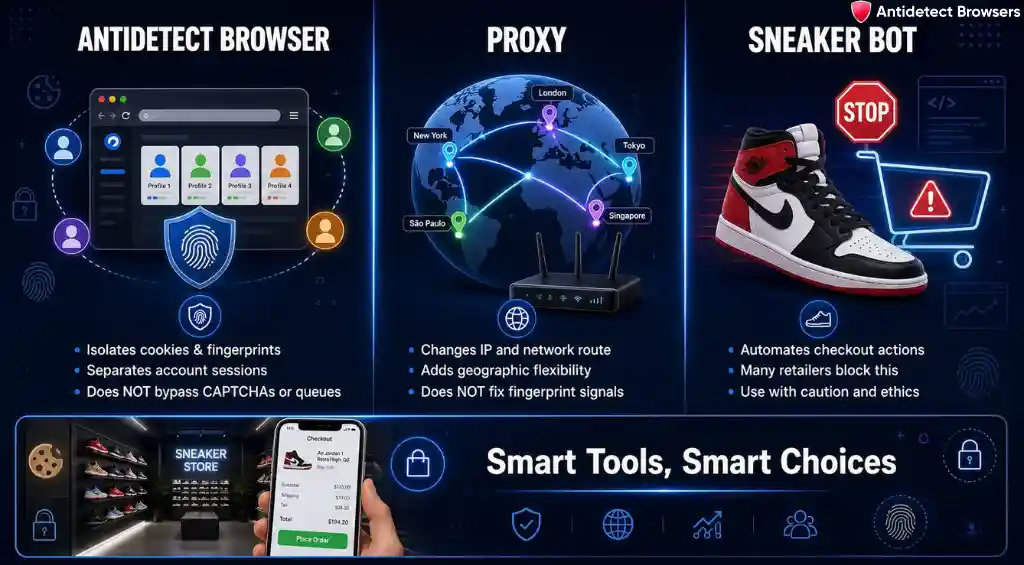
These three tools often get bundled into one sentence, which creates bad expectations.
An antidetect browser does not guarantee a checkout, skip a queue, solve a CAPTCHA, or make prohibited automation acceptable. Shopify stores can use bot controls during flash sales. Nike also validates entries and removes bot activity. Modern sneaker site anti bot checks look at far more than one fingerprint value.
That makes restraint valuable. Use profiles to preserve clean account sessions, separate authorised client or team work, test regional storefronts with permission, and reduce accidental account mixing. Do not treat fingerprint controls as a licence to imitate many people.
Proxy quality still matters. A cheap endpoint may be slow, blocked, poorly located, or shared by many users. Yet an expensive proxy cannot fix a broken profile. Network identity and browser identity need to agree.
Cookie history matters too. New cookies are not automatically bad, and old cookies are not automatically trusted. A stable account with normal activity, correct contact details, and consistent device signals usually makes more sense than a freshly assembled identity minutes before stock appears.
FAQs About Antidetect Browsers for Sneaker Copping
Can an antidetect browser guarantee a sneaker checkout?
No. It can separate browser sessions and keep profile data consistent. It cannot control stock, queues, retailer selection, card approval, CAPTCHA checks, or purchase rules.
Which antidetect browser is our top pick for sneaker copping?
Dolphin Anty. Its profile table, proxy checks, cookie tools, Scenarios, and synchroniser create a friendly start without stripping away useful control.
Do residential proxies replace browser profiles?
No. Residential proxies for sneakers change network identity. A browser profile holds cookies, storage, fingerprint data, extensions, and saved sessions. Both layers serve different jobs.
Should every profile use a different proxy?
Use a stable network identity for each authorised account where retailer terms permit proxy use. A separate endpoint can prevent accidental IP mixing, but it does not permit extra accounts or extra entries.
Can Chrome private mode do the same job?
No. Private mode removes local data after closing. It does not create a separate fingerprint, persistent cookies, profile notes, proxy binding, or a saved account environment.
Does Multilogin still support Stealthfox in 2026?
Stealthfox remains available as a legacy Firefox option, but it no longer receives new cores or fixes. Mimic is the actively supported browser core.
Does AdsPower support both Chrome and Firefox based profiles?
Yes. SunBrowser uses Chrome technology, while FlowerBrowser uses Firefox technology. Several AdsPower tools, including its synchroniser, work only with SunBrowser.
Do retailer rules still apply when an antidetect browser is used?
Yes. Always. One person and one entry means exactly that. Profile software does not cancel retailer terms, local law, payment rules, or anti bot controls.
Our Final Call on Sneaker Copping Browsers in 2026
Dolphin Anty is our top pick. It gives beginners a clear profile table, sensible defaults, useful proxy checks, cookie tools, Scenarios, and a synchroniser without making basic setup feel technical. That balance matters more than a giant feature count.
Multilogin is our next call when web profiles and Android cloud phones need one controlled workspace. GoLogin earns its place through cloud access and easy location matching. Octo Browser stands out for fresh Chromium cores and fine control. AdsPower brings two browser families and the largest process toolkit.
No browser can promise a win on limited edition sneaker releases. Stock, retailer selection, queues, payment checks, regional limits, and random draws remain outside browser control. Pick a tool that helps keep legitimate sessions consistent, then keep the setup boring. Boring is good. Boring means fewer last minute surprises.