Linken Sphere is a Chromium-based antidetect browser for Windows and macOS. A London company sells it to operators who want to set fingerprint values by hand.
Quick answer: Linken Sphere is a power-user antidetect browser with a free 5-session plan and paid plans from 30/month (24 billed yearly). The Local API and team roles start on Pro at $160 a month. Buy it for deep fingerprint control on Windows or macOS; skip it if you need Linux, mobile apps or cheap seats.
Lab Card: Linken Sphere
| Engine | Chromium, with Hybrid 2.0, normal and config-pool fingerprint modes |
| Platforms | Windows 10+ and Server 2016+, macOS 13 Ventura+ (Apple Silicon and Intel), 64-bit only. No Linux, no mobile app |
| Free plan | Yes: 5 sessions, no time limit, local storage only |
| Paid from | Pure: $30 a month for 30 sessions, or 24/ month billed yearly |
| Best for | Experienced operators who tune fingerprints by hand; developers who want a local API with no request caps |
| Not for | Linux users, beginners who want one-click setup, small teams that need roles for under $160 a month |
A client wants its new checkout tested from 25 browsers: Windows laptops, MacBooks, Android and iPhone. Your current tool offers three presets and a shrug. Linken Sphere offers a five-block setup screen, three fingerprint modes and a green, yellow or red uniqueness indicator.
That control is why power users stay, and why newcomers bounce. This Linken Sphere review covers both sides. Comparing the whole field? Start with our best antidetect browsers rankings.
What is Linken Sphere?
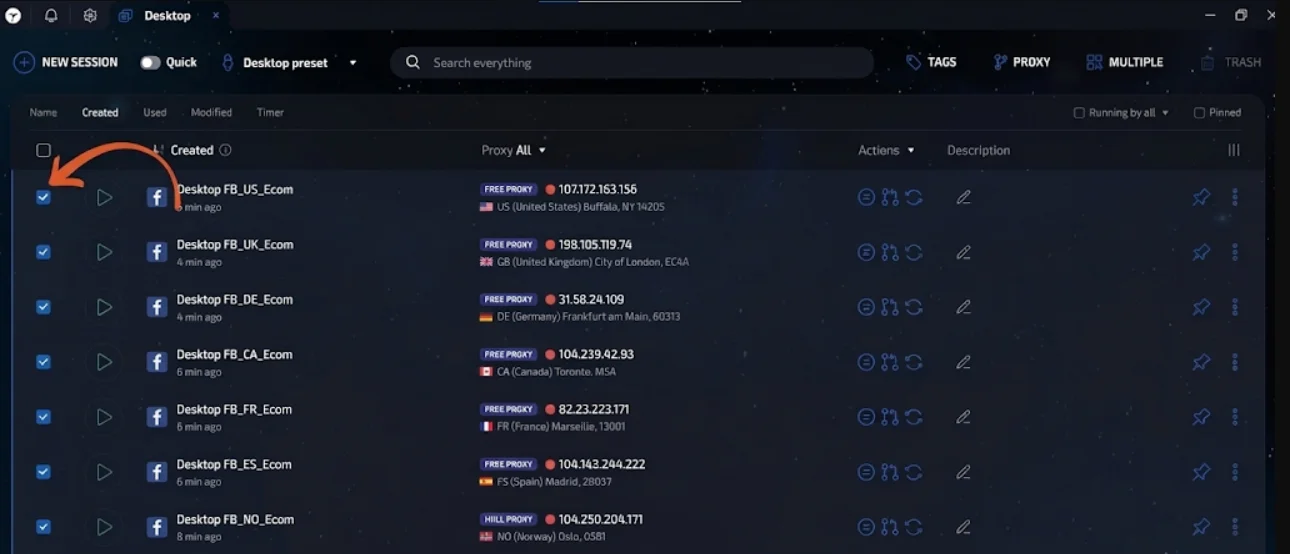
Linken Sphere is an antidetect browser that runs many isolated sessions on one computer. Each session keeps its own fingerprint, cookies, storage and proxy, so a site sees separate devices. “Session” is Linken Sphere's word for a profile.
The current client is Linken Sphere 2. Its version history lists v2.21.0 as the newest release, with a Chrome 151 engine and over 50 fingerprint changes.
Not to be confused with Linken's Sphere, the Dota 2 item that blocks spells.
Where does Linken Sphere come from?
| Date | What happened |
|---|---|
| 23 Oct 2024 | Legendary Software Limited, the company in the ls.app footer, is incorporated at the same Ruislip, London address (company 16035718, active) |
| 1 Nov 2023 | The vendor relaunches the product on full Chromium and says the 2017 team returned with new developers |
| 7 Jan 2020 | Recorded Future's Insikt Group publishes a research profile of the browser |
| Early 2019 | Development largely stops after the team splits, per the vendor |
| 4 Jul 2017 | The browser is first advertised on Russian-language underground forums, per Insikt Group |
Insikt Group assessed that early versions were widely used to get around anti-fraud systems at financial and e-commerce firms, while the developers marketed legitimate uses. We state that record plainly, then judge today's product on legitimate multi-account work.
Linken Sphere download and system requirements
The download is free from ls.app/download: a Windows installer plus separate macOS builds for Apple Silicon and Intel. Per the system requirements, you need 64-bit Windows 10, 11 or Server 2016 to 2025, or macOS 13 Ventura or later.
Minimum specs are 4 GB of RAM, 40 GB of free disk and a physical graphics card. The vendor recommends 16 GB, an SSD and a 100 Mbps line, since sessions sync at every launch and close.
There is no Linux build and no mobile app. On Linux, see our list of antidetect browsers for Linux.
How we tested Linken Sphere
We read prices, limits, the FAQ. Hands-on numbers come from a free and a Pro account once the tests below are done.
Our protocol:
We ran no account-survival tests and will not publish ban rates. Those depend on your proxies, your behavior and each platform's rules more than on the browser.
Linken Sphere browser features that matter
How do Linken Sphere sessions work?
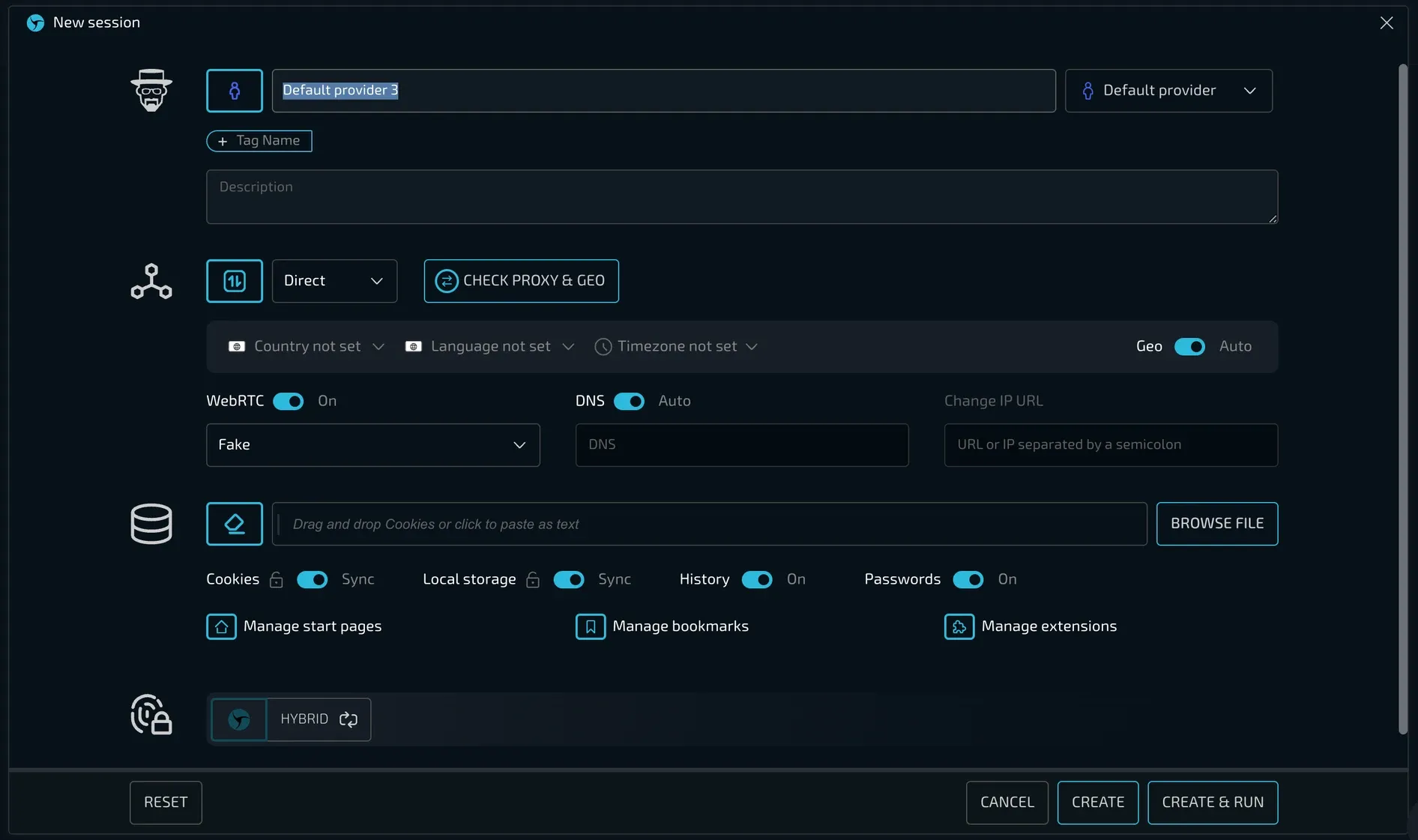
A new session opens a five-block setup screen:
Sessions live on “desktops”, isolated groups you can split by client. Every plan gets unlimited desktops.
Fingerprint modes: Hybrid 2.0, normal and config pool
This is where Linken Sphere earns the power-user label. Block 4 offers three modes:
The block covers Canvas, WebGL, ClientRects, Audio, WebGPU and MediaDevices, and a uniqueness indicator shows green, yellow or red.
Two hardware catches. Hybrid 2.0 needs a physical graphics card, so a VPS with a virtual GPU must use normal mode. And a session moved to another machine will not look identical, so the FAQ suggests one shared remote server for teams.
Our browser fingerprinting guide explains what each value reveals.
Proxies and connection types
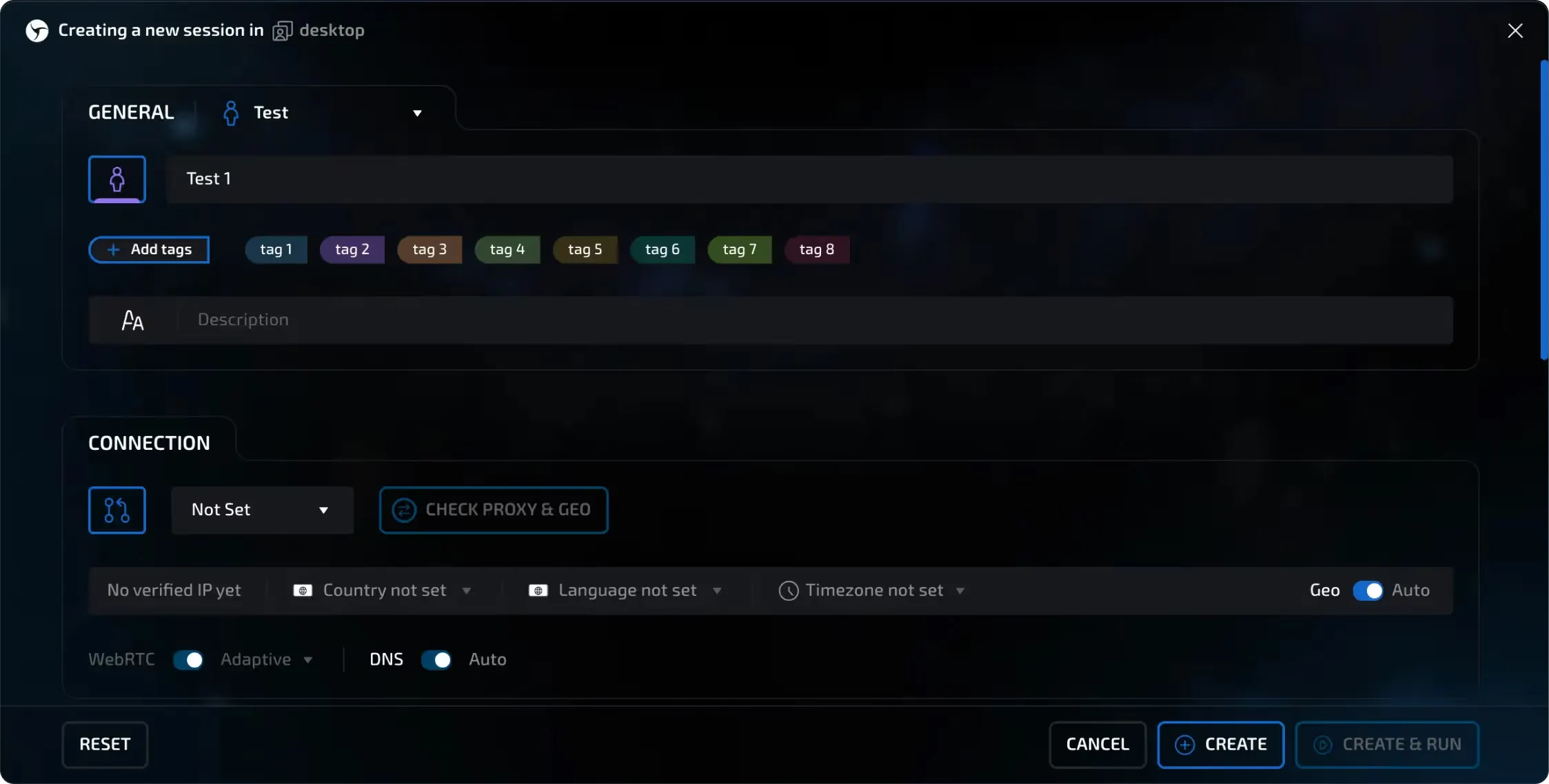
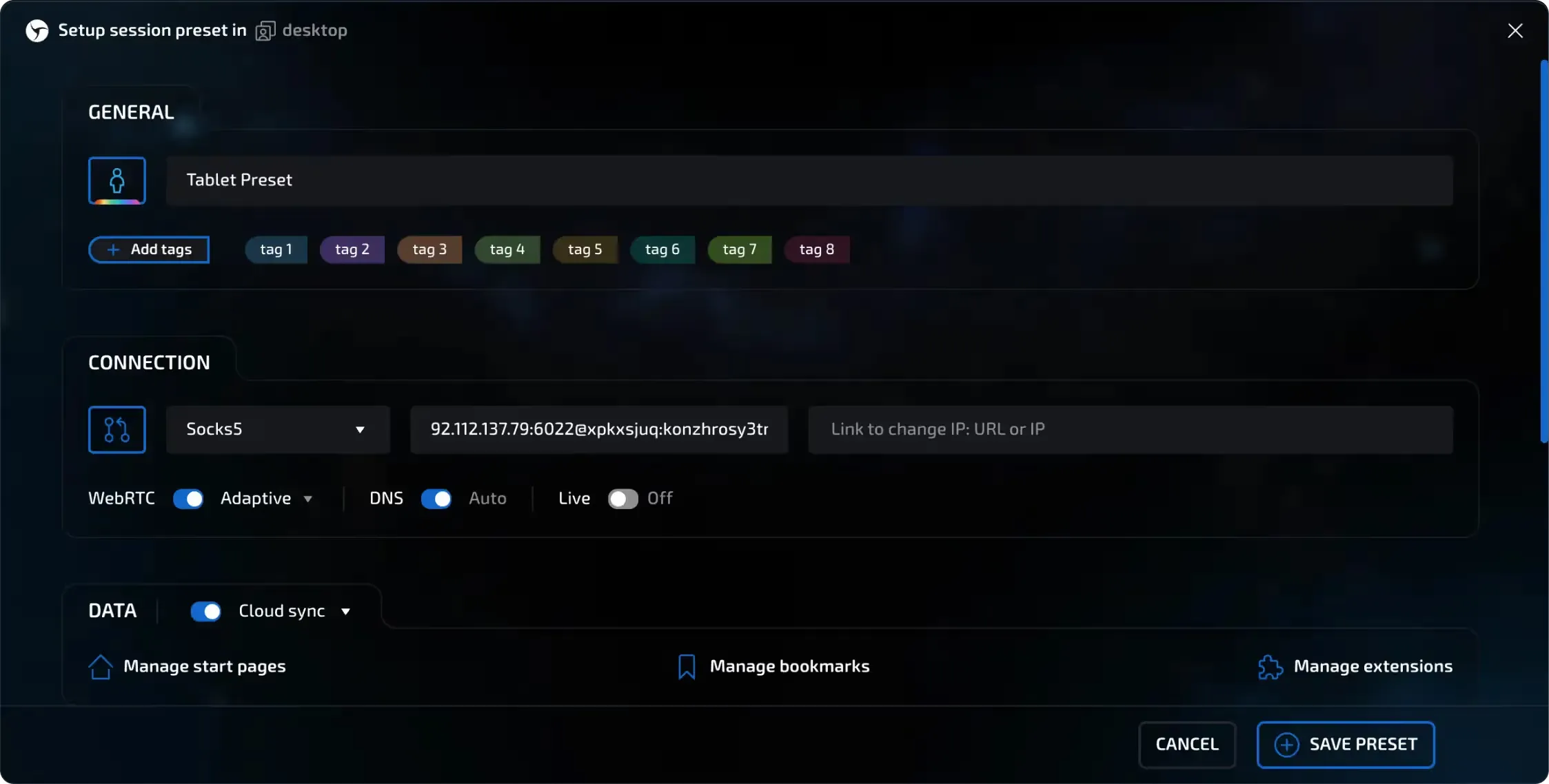
Block 2 takes SOCKS5, HTTP, SSH, Tor, a free proxy or Sphere Proxy, among others. WebRTC can be Adaptive (the default), Fake, Direct, N/A or Off, and auto geo matches timezone and language to the exit IP.
Sphere Proxy is the vendor's residential proxy, billed per GB on top of the plan. It blocks some payment sites (PayPal, Stripe, Adyen, Apple) and does not support UDP or QUIC. Light, Pro and Premium bundle 100, 300 or 1,000 free proxies.
A SOCKS proxy without its own DNS can expose your real IP. More in our guide to proxies for antidetect browsers.
Warm-up robot, presets and bulk creation
The warm-up robot (Pure and up) simulates a visitor arriving from a search engine and browsing pages. Presets fill all five setup blocks in one click, and bulk creation builds many sessions from an uploaded preset.
Local API and automation
The API is why developers shortlist Linken Sphere. It runs on Pro and Premium only, and it stays off until you set a port in global settings.
No caps is unusual: Octo Browser's Base plan allows 50 requests per minute. Compare vendors in our antidetect browser API roundup and our list of antidetect browsers for web scraping.
Team management and data storage
One member may only launch sessions, another may clone or delete them. You can pass sessions between members with cookies and proxy intact, password-lock single sessions and turn on 2FA.
The gate is steep. Pure lets several people use one account at once, but team management and roles start on Pro (10 members). Premium removes the cap.
Session data is stored locally and encrypted, with cookie sync off until you enable it. Session metadata (name, proxy, settings) always sits on the vendor's server.
Linken Sphere pricing: how much does it cost?
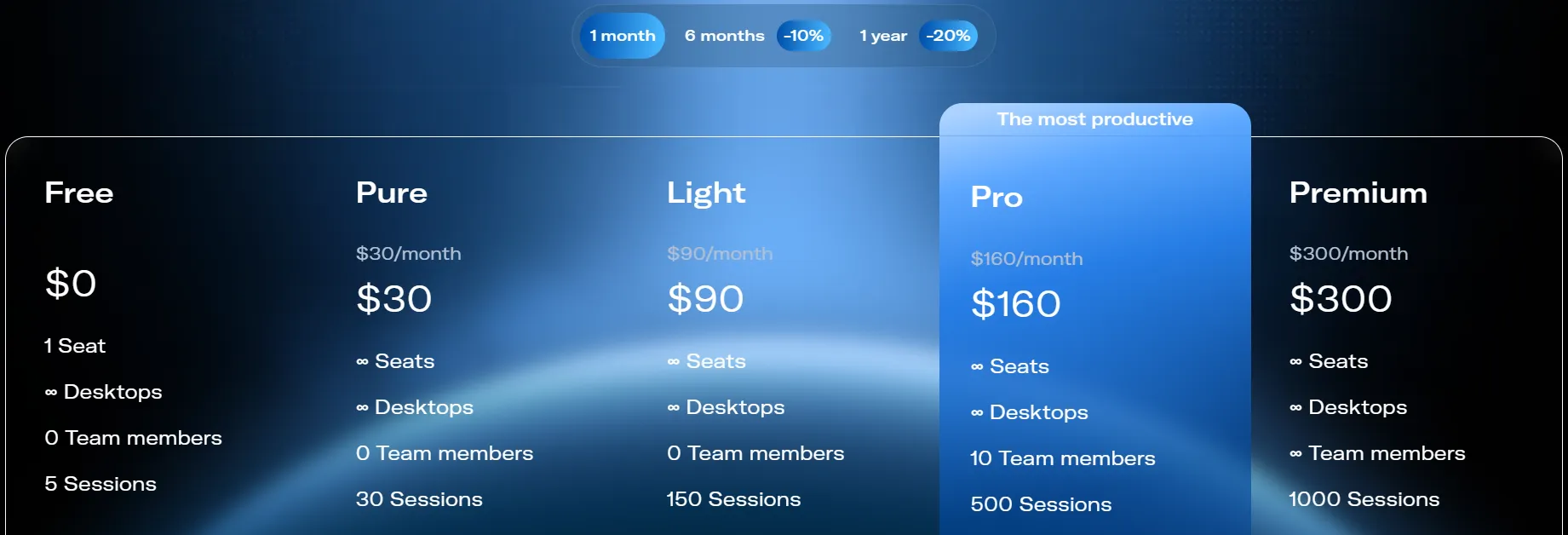
Linken Sphere costs $30 to $300 a month on monthly billing, or $24 to $240 a month billed yearly, on top of a free plan.
| Plan | Monthly billing | 1-year billing (per month / per year) | Sessions | Team members | Key additions |
|---|---|---|---|---|---|
| Free | $0 | $0 | 5 | 0 | 1 workspace, local storage only |
| Pure | $30 | $24 / $288 | 30 | 0 | Cloud sync, warm-up, simultaneous logins |
| Light | $90 | $72 / $864 | 150 | 0 | Config pool, mobile emulator, proxy analytics, 100 free proxies |
| Pro | $160 | $128 / $1,536 | 500 | 10 | Local API, team management, session log and backup, 300 free proxies |
| Premium | $300 | $240 / $2,880 | 1,000 | Unlimited | Personal onboarding manager, beta access, 1,000 free proxies |
Is Linken Sphere free?
Yes, with limits. The free plan has no time limit and gives you 5 sessions, 1 workspace and unlimited desktops. Sessions are stored only on your machine, so a reinstall or a dead drive loses them. There is no cloud sync, warm-up or team access.
Price Reality: what does one Linken Sphere session cost per month?
Divide each price by its session cap. Linken Sphere starts expensive and gets cheap at volume.
| Plan | Monthly price | Sessions | Per session, monthly billing | Per session, 1-year billing |
|---|---|---|---|---|
| Pure | $30 | 30 | $1.00 | 0.80(24 / 30) |
| Light | $90 | 150 | $0.60 | 0.48(72 / 150) |
| Pro | $160 | 500 | $0.32 | 0.26(128 / 500) |
| Premium | $300 | 1,000 | $0.30 | 0.24(240 / 1,000) |
The painful step is Light to Pro. Need the Local API or real team roles? You pay $160 a month even if 150 sessions is plenty.
Multilogin is cheaper per profile in the middle: 0.40onBusiness100(40) and about 0.30onBusiness300(89), with unlimited seats. Linken Sphere's case rests on control, not price.
Where Linken Sphere falls short
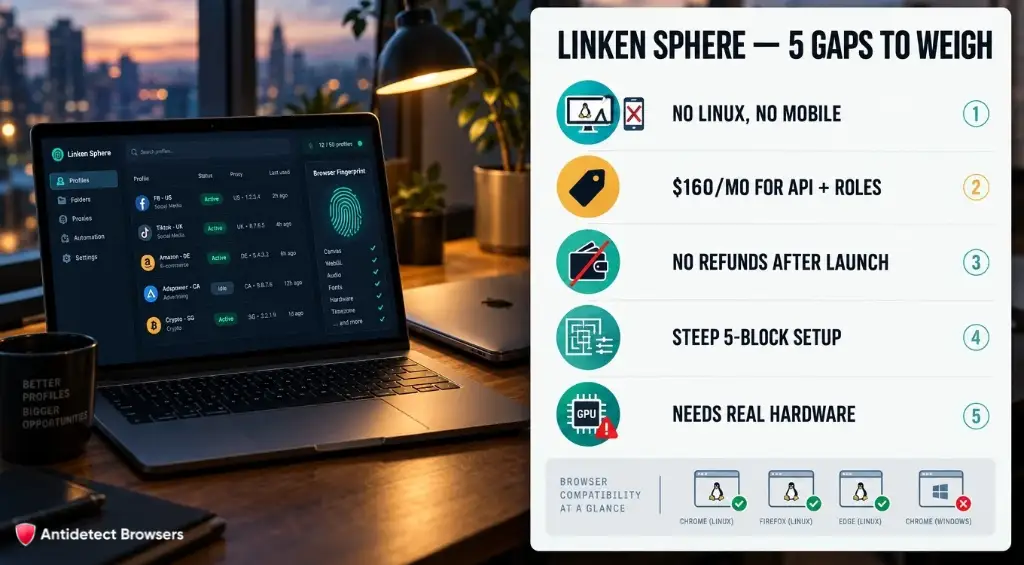
Linken Sphere vs Alternatives
Linken Sphere has the priciest paid entry of these four, but the only API with no request caps. Figures from each vendor's official pages, checked 4 Nov 2026.
| Antidetect Browser | Linken Sphere | Multilogin | Octo Browser | Dolphin{anty} |
|---|---|---|---|---|
| Free plan | Yes, 5 sessions | Yes, 5 cloud profiles (up to 1 cloud phone) | No | Yes, 3 profiles |
| Paid from (monthly billing) | $30 (Pure, 30 sessions) | $11 (Pro 10) | €10 (Lite, 3 profiles) | $10 (Starter, 20 profiles) |
| API from | Pro, $160, no RPM caps | Pro 10, 50 RPM | Base, €79, 50 RPM | Starter, $10, 1,500 RPM |
| Team seats from | Pro, $160 (10 members) | Pro 20, $19 (2 seats); unlimited on Business 100, $40 | Team, €169 (3 members) | Base, $89 plus $10 per extra user |
| Linux | No | Yes | Yes | Yes |
| Trustpilot | 3.6 | Score hidden by Trustpilot | 4.4 | 2.5 |
Should you buy Linken Sphere?
Buy it if:
Skip it if:
FAQ About Linken Sphere
What is Linken Sphere?
Linken Sphere is a Chromium-based antidetect browser for Windows and macOS, sold by Legendary Software Limited in London. It runs isolated sessions, each with its own fingerprint, cookies, storage and proxy, so sites see separate devices. It offers three fingerprint modes, a warm-up robot, and a Local API on the Pro and Premium plans.
Is Linken Sphere safe?
The vendor says session data is stored locally and encrypted, with cookie sync off by default. The bigger questions sit elsewhere: no refunds once launched, a documented origin on underground forums, and a 3.6 Trustpilot score. Download only from ls.app, pay only on the in-app license page, and ignore anyone asking for payment by private message.
Is Linken Sphere free?
The free plan has no time limit and includes 5 sessions, 1 workspace and unlimited desktops. Sessions are stored only on your computer, with no cloud sync, warm-up or team access. It is the only way to try Linken Sphere before paying, because the paid software is non-refundable once launched.
How much does Linken Sphere cost?
On monthly billing, Pure costs $30 (30 sessions), Light $90 (150), Pro $160 (500) and Premium $300 (1,000). Paying for a year cuts that by 20%, to between $24 and $240 a month, and six months saves 10%.
Does Linken Sphere work on Linux, iOS or Android?
No. It runs only on 64-bit Windows 10 or later and macOS 13 Ventura or later, with Apple Silicon and Intel builds. There is no Linux build and no mobile app. You can emulate Android and iOS devices inside the desktop client, and the mobile emulator is listed from the Light plan.
Linken Sphere review verdict: is it worth it?
For experienced operators on Windows or macOS, yes. You get three fingerprint modes, one fully manual, plus a Local API with no request caps. At 500 sessions on Pro, one session costs $0.32 a month.
For everyone else the catches add up: no Linux, no refunds once launched, roles from $160 and a history you should know about. Start on the free plan, test your setup on Pixelscan, and pay only when the results hold.